Next Commerce x Make.com - Create Automations & Integrations
Build custom integrations between your Next Commerce store and hundreds of popular apps and platforms using Make.com
- New in the Next Commerce App Store - Make.com!
- Use Make to build custom integrations between Next Commerce and hundreds of other applications and platforms
- Build no-code ecommerce automations and workflows in minutes
It’s never been easier to create seamless connections between Next Commerce and your favorite apps - Next Commerce now has a full integration module on Make.com. Using Make’s user-friendly visual interface, anyone with a Next Commerce store can create cross-platform workflows that connect Next Commerce and hundreds of other apps without needing any code. You can create, test run, and implement integrations and complex automations in a matter of minutes. If you’ve never used Make before, or want to know just what’s possible using Next Commerce’s integration module, we’ve got you covered.
Learn more about Next Commerce + Make here
What is Make.com?
Formerly known as Integromat, Make is a leading integration service provider that allows users to easily create cross-platform integrations. With over 1,200 apps in their library and nearly 6,000 templates, Make does all the complicated technical work behind the scenes, simplifying the process for everyone from developers to the tech-unsavvy.
How easy is it? You can create a free account on Make and start building integration scenarios - workflow automations on Make - immediately. Make’s highly visual scenario builder lets users drag and organize different modules to create their desired integration scenarios.
An example scenario would look like this:
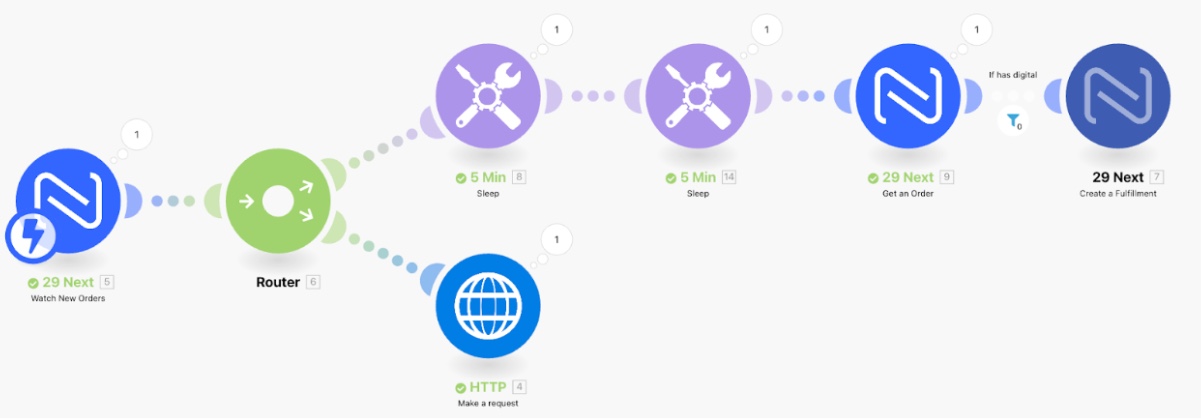
This scenario updates the fulfillment status of specific line items on Next Commerce orders after waiting 10 minutes
Create Make Scenarios with Next Commerce
Next Commerce’s open API framework enables merchants to create custom integrations between their Next Commerce store and other apps and services that they use. While some merchants might hire a developer to build integrations manually, those who don’t can use Make to create automations with custom logic without needing any coding at all. In that sense, Make saves time and money on building the custom integrations they need to improve their operational flow.
For example, using a Make scenario, merchants can pass over order and customer information from their Next Commerce store to a spreadsheet or accounting software like Airtable, Google Sheets, or Xero. Or, they can pass orders to an invoice generator, which in turn automatically emails the customer with a PDF of their invoice and simultaneously uploads a copy of the invoice to a Google Drive.
Next Commerce’s module on Make is new, but in the near future you can expect to find a library of automation templates from Next Commerce on Make.com.
If we haven’t said it enough, here it is again: it’s fast and easy to build integrations and workflow automations with custom logic on Make, saving you time and money to orchestrate your custom processes. The possibilities for custom scenarios through Make are almost limitless, so you will undoubtedly improve your operational efficiency by utilizing Make’s service to connect Next Commerce with your other tools, apps, and platforms.