How to Get More Revenue From Your Email Campaigns With NEXT Funnels
Warm email traffic is your highest-intent audience. Here's how to send it into NEXT funnels and checkout links, and how to measure what each campaign earns.
Someone who clicks a link in your email has already told you something: they want to buy. They know the brand, the offer caught their attention, and they tapped through with intent.
For a lot of DTC ecommerce brands, that high-intent click lands on a standard product page, the same one any cold customer would find through search. That page can close the sale, but it was designed to convert a new visitor who needs to be sold to, not a warm lead who already responded to your email. Media buyers stopped sending ad traffic to bare product pages years ago, and warm email traffic deserves the same treatment.
Sending the shopper to a branded funnel or custom checkout raises conversion rate by matching the landing page to the intent behind the click. It can lead with the offer from the email pre-selected, raise order value with a bundle, introduce another product through an upsell, and offer a subscription next to the one-time purchase. With identical traffic, the opportunity per click gets much larger.
For email agencies, this is where client results are decided. You control the subject line, the segment, and the creative, but revenue gets won or lost on the pages after the click. A strong campaign that sends traffic to a generic product page is wasting its best clicks, whereas a destination built for each send makes every campaign you run perform better.
And with NEXT, marketers can build that destination themselves, as fast as they’d launch a new ad: a fully custom funnel for every offer, with no developer queue slowing them down.
How to Increase Average Order Value From Email Campaigns
A funnel built around the send gives you four levers that a product page doesn’t:
- Offer continuity: The landing page repeats the promise from the email, so the shopper never wonders whether they’re in the right place
- Higher AOV: Bundles and quantity tiers put a bigger first order in front of someone who is already leaning toward buying
- Upsells: A post-purchase offer introduces a second product to a customer who just said ‘yes’
- Subscriptions: A recurring option inside the same flow can turn a single purchase into a repeat customer
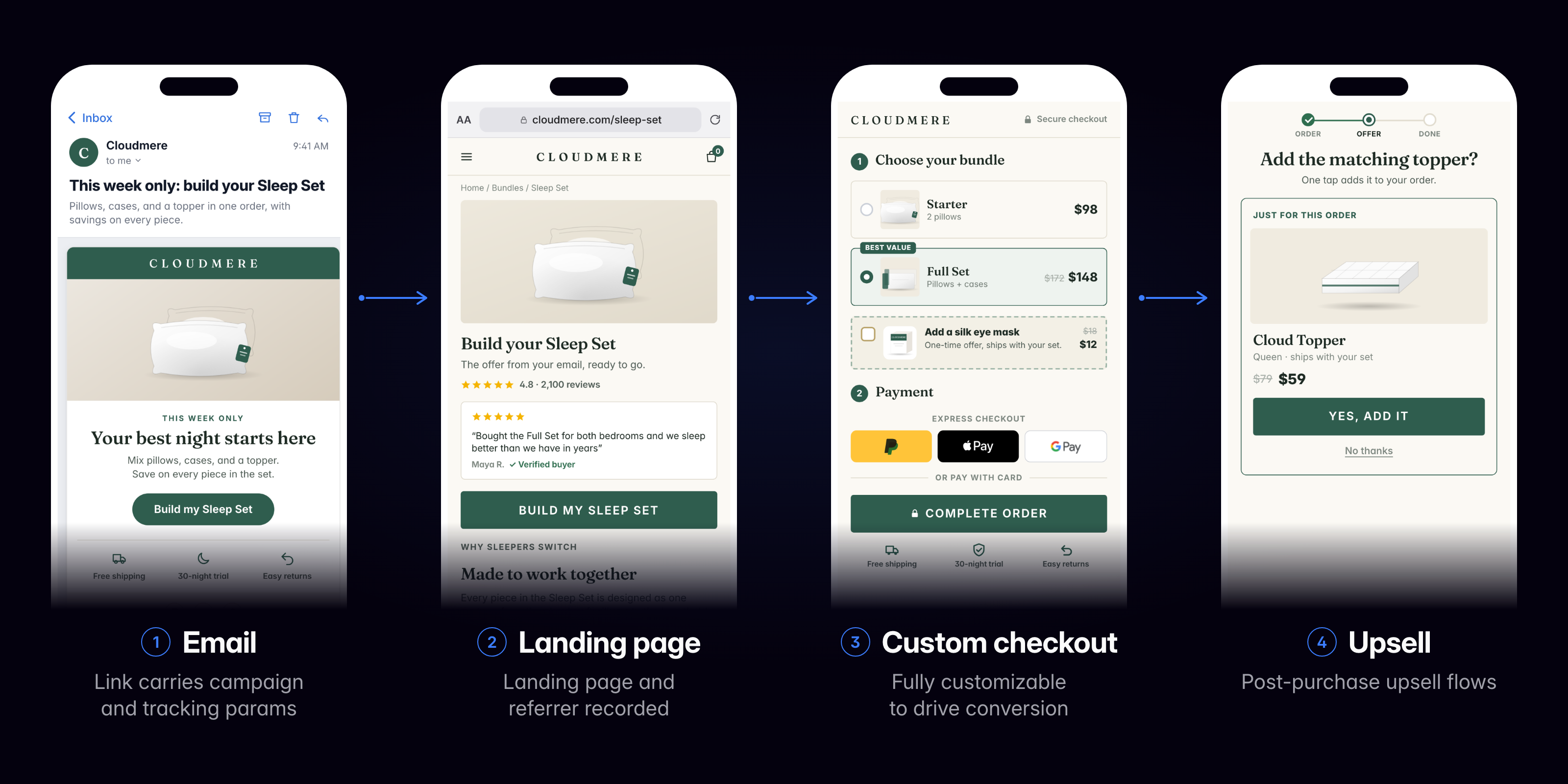
How NEXT merchants typically structure their email campaigns
Each lever maps to a number you (or your clients) already track: conversion rate, AOV, revenue per recipient, and repeat purchase rate.
How to Build a Landing Page for Every Email Campaign
Marketers build custom landing pages and checkout flows with NEXT’s agentic, AI-assisted tooling, without the need for a developer. Every page is fully custom, so each funnel matches the offer, the creative, and the tone of the email that sends the traffic. In practice, that means:
- One funnel per offer: A launch, a promo, a restock, and a win-back each get their own landing page, checkout, and upsell
- Clone and iterate: Duplicate a funnel that works, change the headline, bundle, or offer, and have a new version ready for the next send
- CRO without a queue: Test a new headline, bundle, or upsell on one segment and read the result before the next send goes out
- Split testing from your ESP: Split the send across funnel variants and compare each funnel’s performance in NEXT’s Campaign Analytics
A product launch email opening a custom checkout with bundle selectors
Distribution is simple. For broadcast sends, point the email CTA at the funnel landing page, or at a checkout link that pre-loads the cart and carries attribution parameters. For automated flows (abandoned-cart, post-purchase, win-back, and subscription sequences), NEXT sends commerce events like Started Checkout, Placed Order, and subscription activity to your ESP to trigger them. Klaviyo connects natively through a built-in NEXT app, and other ESPs bridge through Make.com using the same events.
Already on Shopify? You don’t need to replatform to start. Shop Sync lets you run NEXT funnels while your Shopify operations stay intact, and brands that run the whole store on NEXT get their funnels, subscriptions, and reporting in one place.
Want to see how fast a funnel goes live?
Chat with us and bring your next email offer. We’ll show you what the funnel could look like.
Email Remarketing: Turn Existing Customers Into Repeat Revenue
Every remarketing campaign, whether a launch, a promo, a restock, or a win-back, deserves its own landing page. Because funnels are quick to build, you can give each campaign exactly that, matched to the segment you’re sending to:
| Campaign | Segment | Destination |
|---|---|---|
| Product launch | Past buyers of related products | Funnel with a launch bundle |
| BFCM or seasonal promo | Full list, split by purchase history | Funnel with quantity tiers |
| Restock | Past buyers of that product | Checkout link with product and subscription interval pre-loaded |
| Win-back | Lapsed customers | Funnel with a voucher applied |
| Abandoned cart | Started Checkout, no Placed Order | Checkout link back to the cart |
In addition to funnels, checkout links fast-track the customer to a pre-populated checkout. A link can pre-load products, quantities, a subscription interval, and a voucher, and it carries attribution parameters. Use a checkout link when the offer is simple and you want the fewest steps; use a funnel when the offer needs a bundle, an upsell, or a subscription pitch to do its job.
How to Track Email Campaign Performance and Revenue
Every order from a NEXT campaign funnel carries attribution data: the landing page, the referrer, the device type, and the campaign it came from. The Campaign Cart SDK also captures the parameters on your links, such as UTMs and click IDs, and sends them with the order. Tag every email link (Klaviyo has a toggle that adds UTMs automatically) and use utm_content to tell variants apart. Events can also forward to destinations such as GTM and Meta’s Pixel and Conversions API, so the rest of your reporting stays in sync.
Inside the Campaigns app, Campaign Analytics covers sessions, carts, orders, sales, conversion rate, and AOV per campaign, plus Events by Page to show where email visitors drop off. Device and browser splits matter too. Email clicks often happen on a phone, and a mobile-only checkout problem can hide in a healthy blended average.
For agencies, top-level stats such as revenue, conversion rate, and AOV per campaign demonstrate the post-click value you generated for your clients.
Start With One Send
If you run email for clients, start small. Pick one send, build a funnel around its offer, and point the email at it. A funnel built for one email only gets that email’s traffic, so its numbers in Campaign Analytics are that email’s numbers. Set them next to your storefront sales for the same offer and the comparison is on the page.
When the funnel wins, you have a post-click result to show the client and a setup you can repeat on every send after it. Agencies that can show revenue per send, down to the funnel, are the ones clients keep.
Ready to see it on your own sends? Chat with us and we’ll walk you through the funnel, the checkout, and the numbers, and show you how NEXT can drive meaningful revenue for your business.
FAQ
No. Marketers build custom landing pages and checkout flows with NEXT's agentic, AI-assisted tooling, clone and test variants, and publish without a developer.
No. Shop Sync lets you run NEXT funnels while your Shopify operations stay intact, so you can start with the funnels on your next send and move more of the store over as the results come in.
Klaviyo connects natively through a built-in NEXT app. Other ESPs connect through Make.com using the same commerce events, including Started Checkout, Placed Order, and subscription activity.
Use a checkout link when the offer is simple and you want the fewest steps. Use a funnel when the offer needs a bundle, an upsell, or a subscription option.
Tag every email link with UTMs and use utm_content to separate variants. Orders carry the landing page, referrer, device type, and campaign, and Campaign Analytics reports sessions, carts, orders, sales, conversion rate, and AOV per campaign.
Split the send across funnel variants from your ESP and compare each funnel in Campaign Analytics. To test a funnel against your storefront, send one segment to the funnel and compare its results in Campaign Analytics with storefront sales for the same offer.